managing Your CUPSO Member Profile
If your center or institute is already a member of CUPSO, this page offers help for managing your center/institute's Master profile, as well as for accessing the system and updating individual sub-accounts. For help setting up individual sub-accounts, please email Ashley Labosier (labosier@sog.unc.edu).
How do I access my online profile?
You need to first log into the community. Click on the "Profile Home" button if you are on the front end of the website. This can be found on either the homepage or in the "My Profile" box located in the sidebar on every other page:

How do I reset my password?
Click the Login button at the very top of the website or the login box that is located both on the homepage and in the sidebar on every page: https://www.cupso.org.
Then just click “Forgot your password?” right under the password field. (See image below.)
-
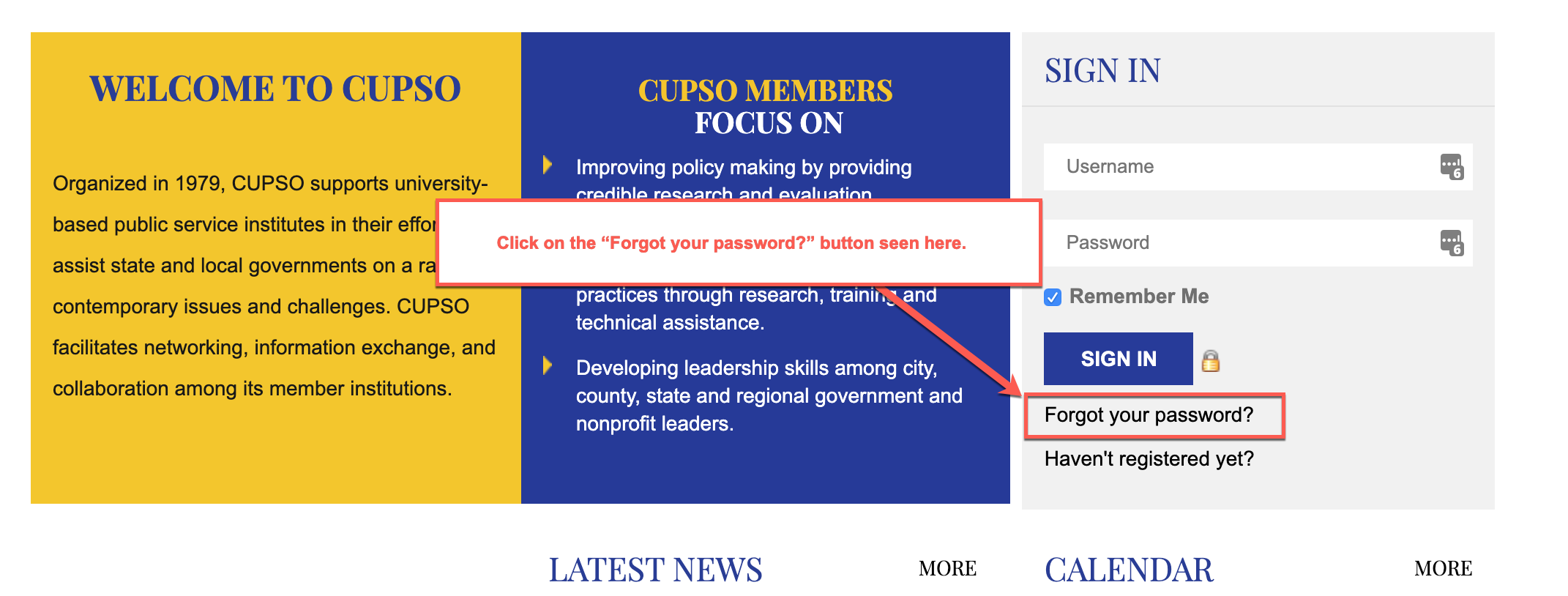
Still having trouble? Contact Ashley Labosier and she can reset your password from the back end.
My account is suspended, what do I do?
If you log into the website and receive the following message, your master account has not been paid for this year yet. You will need to contact your business office and receive a status update on a timeline from them.

- If you believe you are receiving this message in error, please contact Ashley Labosier.
How do I pay my membership dues?
Dues invoices will be sent in April to the email address associated with your center/institute's master account. If you would like to confirm or change this email address, please contact Ashley Labosier.
For those who need to pay by check, remittence information is on the invoice.However, the easiest way to pay is online through the member portal. Just log into your master account. If it is up for renewal you should be immediately redirected to pay before you can fully log into the community. If you are not, you can follow this process:
1) choose "invoices" under your name in the upper right hand of your screen or in the "payments and history" tab on the right side of your profile.
-

-
2) on the "payments and history" page, make sure you select the tab for "dues" rather than "store & events". Click on the "status" dropdown filter to help narrow your search.
-
-

3) You will find your invoice as well as a link to pay online by credit card.
What if I need to cancel my membership?
Please email Ashley Labosier at labosier@sog.unce.edu to cancel your membership. Please note that if the reason for cancelation is financial, we would love to work with you to keep you involved. We want CUPSO to be accessible to large and small centers through all the fluctuations of public service in the university.
If you are due a refund, we will work with you to process that as well.
How do I access my online profile?
You can log into the community through the CUPSO website (on the home page or the right hand side bar of any sub-page). If you are logged in, click on the "profile home" button if you are on the front-end of the website. This can be found on the homepage or in the "My Profile" box located in the sidebar on every other page:

-
How do I update my profile?
When you log in from the home page you will see a "My Profile" box in the place that the login box was previously located.
Click on the "manage profile" button if you are on the front-end of the website. This can be found on either the homepage or in the "My Profile" box located in the sidebar on every other page.
-

How do I get to the front end of the website from the member portal?
You can always navigate easily back to the front end of the website by clicking on the CUPSO logo at the top left of the page.
-
-


 Print Page